 EVE卫浴
EVE卫浴
Why Has My Touch Faucet Stopped Working — and How Do I Get It Spraying Again?
浏览次数:307 分类:公司产品
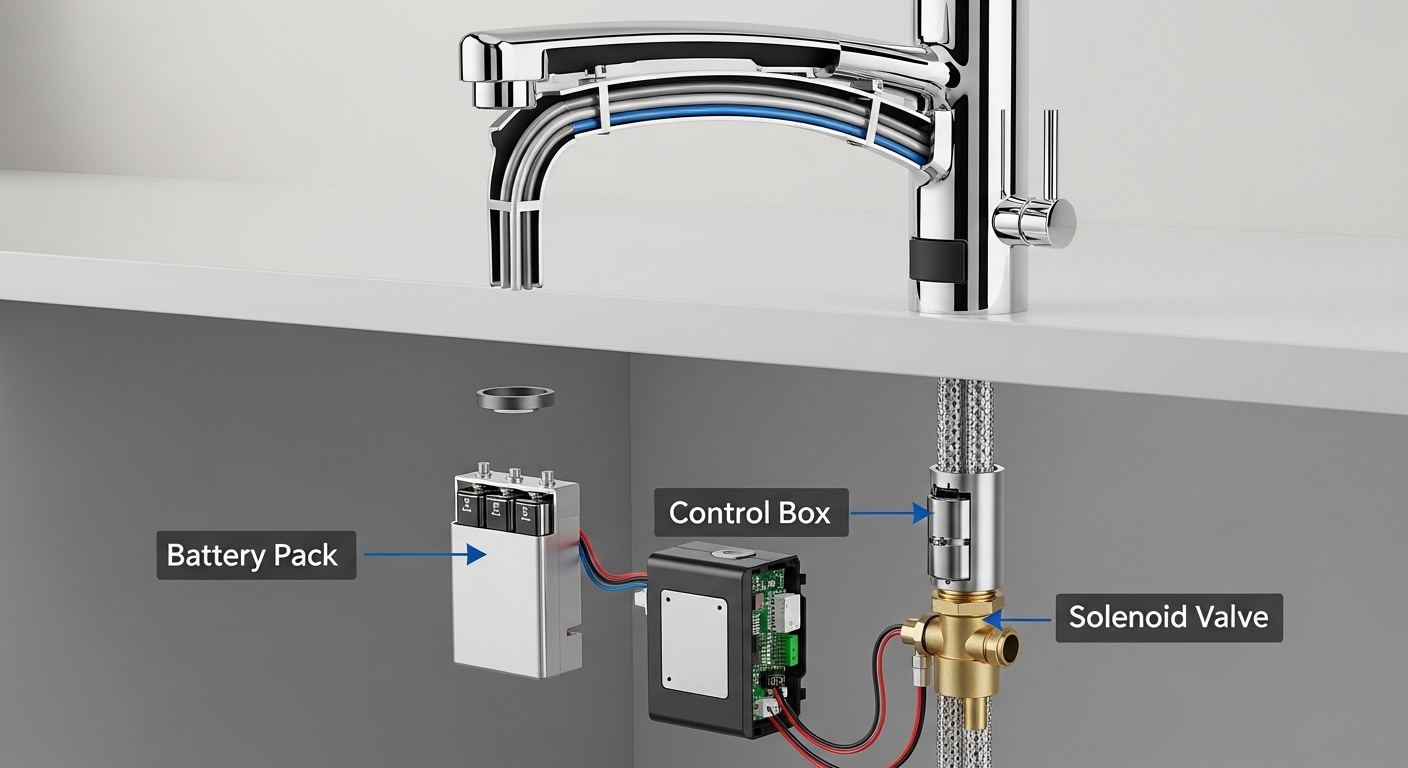
If your touch faucet stopped working — the water won’t start when you tap it, the LED is blinking or dead, or it turns on by itself at random — the good news is that almost every cause is a cheap, DIY-level fix. A touch (or touch-activated) faucet is really two faucets in one: a normal manual valve you operate with the handle, and an electronic layer (battery pack, control box, and solenoid valve) that lets a light tap turn the water on and off. When the electronic layer misbehaves, the faucet feels “dead,” but the plumbing underneath is usually perfectly fine.
Below, I’ll walk you through exactly why these faucets quit, how to diagnose yours in the right order (cheapest and most likely first), and when it’s actually smarter to replace the faucet than to keep chasing the fault. I’ve repaired and tested dozens of touch and touchless kitchen faucets, and the same three or four culprits come up again and again.
What are the most common reasons a touch faucet stops working?
The most common reason a touch faucet stops working is dead or weak batteries — followed by a loose or disconnected solenoid wire and a corroded connection. These three account for the overwhelming majority of “my touch faucet died” cases. Here’s the quick rundown before we dig into each:
- Dead batteries (most common): The 4-6 AA batteries or lithium pack that power the solenoid are drained.
- Low-battery lockout mode: Many faucets disable touch and fall back to handle-only operation to protect against a stuck-open valve when voltage drops.
- Loose or unplugged wire harness: The connector between the control box, battery pack, and solenoid works loose over time or gets bumped when you store things under the sink.
- Corroded contacts: A small leak or humidity under the sink corrodes the battery terminals or connector pins.
- Failed solenoid valve: The electronic valve itself has burned out (least common, but it happens after years of use).
- Grounding / signal issues: The touch sensor needs a proper ground; a bad connection makes touch erratic or unresponsive.
Notice that only the last two involve a genuinely failed part. Everything above them is a 5-15 minute fix with zero plumbing.
How do I know if it’s the battery or something worse?
Test the batteries first — if your faucet still runs from the manual handle but won’t respond to touch, that’s the classic signature of a power problem, not a plumbing problem. A touch faucet is designed so the handle always works mechanically even when the electronics are dead. So if the handle gives you water but tapping the spout does nothing, you’ve already narrowed it down to power, wiring, or the solenoid.
Here’s the fast diagnostic sequence I use:
- Try the handle. Water flows from the handle but not from a tap? → Electronic issue (power/wire/solenoid). No water even from the handle? → That’s a plumbing or supply issue, not a touch issue — check your shutoff valves and aerator.
- Check the LED indicator. Most control boxes have a small light. Solid or blinking usually means it has power; completely dark usually means dead batteries or a disconnected pack.
- Swap in fresh batteries. Don’t test old ones — just install a brand-new set. Weak-but-not-dead batteries cause the most confusing intermittent behavior.
- Reseat every connector. Unplug and firmly re-click the harness between battery pack, control box, and solenoid.
- Do a power reset. Disconnect power for 60 seconds, reconnect, and let the faucet re-calibrate its touch sensor.
If touch is still dead after all five steps, then — and only then — are you likely looking at a failed solenoid or control box. If the water is flowing but weak on the touch side, the problem may not be electronic at all; a clogged aerator can throttle flow so badly it looks like the faucet “isn’t really turning on.” Our guide on why a blocked faucet aerator makes your tap barely trickle walks through clearing that in a couple of minutes.
My touch faucet turns on by itself or won’t turn off — what’s going on?
A touch faucet that turns on randomly, cycles on its own, or won’t shut off is almost always signaling a low battery or a grounding fault — not a “possessed” faucet. As the battery voltage drops, the capacitive touch sensor gets noisy and starts misreading ambient electrical signals as taps. The fix is the same as a dead faucet: fresh batteries first, then check the ground wire.
The other frequent cause is a grounding problem. Touch faucets rely on your body completing a tiny electrical circuit; the faucet needs a solid ground reference to tell a real touch from background noise. If the ground wire (often clipped to the supply line or a metal bracket) is loose or the faucet body isn’t properly grounded, you’ll get phantom activations. Reseat the ground connection and make sure it’s contacting bare metal.
A few more specific scenarios and what they usually mean:
| Symptom | Most likely cause | First thing to try |
|---|---|---|
| Handle works, touch doesn’t | Dead batteries or lockout mode | Fresh batteries + 60s reset |
| Turns on/off by itself | Low battery or bad ground | Fresh batteries, reseat ground wire |
| LED blinking rapidly | Low-battery warning | Replace battery pack |
| Totally dead, no LED | Disconnected pack or corroded terminals | Reseat harness, clean contacts |
| Slow to respond / laggy touch | Weak batteries or dirty spout buildup | New batteries, clean the spout |
| Touch works but flow is weak | Clogged aerator, not electronics | Clean or replace the aerator |
One overlooked detail: hard-water mineral buildup on the metal spout can dull the touch sensitivity, because the scale acts as an insulating layer between your hand and the sensing surface. If your touch response has slowly gotten worse rather than failing all at once, descaling the faucet body helps. The same vinegar approach we cover for cleaning a faucet head with vinegar and baking soda works on a touch spout — just keep the solution off the electronic control box.
How do I replace the batteries and reset a touch faucet? (Step by step)
To reset a touch faucet, disconnect the power for about a minute, reconnect it, and don’t touch the faucet for 30 seconds so the sensor can recalibrate. Battery replacement is the other half of the fix. Here’s the full routine that solves most cases:
- Clear out under the sink so you can see the battery pack and control box. They’re usually clipped to the underside of the countertop or the supply lines.
- Locate the battery holder. It’s a small box holding 4 or 6 AA batteries, or on some models a C-cell pack or a rechargeable lithium module.
- Install a fresh, matched set of batteries. Never mix old and new, and never mix brands or chemistries. Match polarity carefully.
- Inspect the terminals. Any white/green crust = corrosion. Wipe it off with a dry cloth or a cotton swab; if a leak caused it, fix the leak too.
- Reseat every connector in the harness — battery to control box, control box to solenoid. You should hear or feel a click.
- Confirm the ground wire is attached to bare metal (supply line or bracket).
- Power reset: leave the batteries out for 60 seconds, reinstall, then leave the faucet completely alone for 30-60 seconds while the LED settles. Touching it during calibration is a common reason people think the reset “didn’t work.”
- Test: tap the spout or handle. You should get a clean on/off with a normal LED response.
Expect fresh alkaline AA batteries to last roughly 6-12 months in a normal kitchen; heavy-use households run through them faster. If you’re replacing batteries every couple of months, you likely have a small current leak from a stuck solenoid or a chafed wire — worth a closer look. Some models also accept an AC adapter that plugs into a nearby outlet, which eliminates battery hassles entirely; if yours supports one and there’s an outlet under the sink, that’s the upgrade I’d make.
Is it worth repairing a touch faucet, or should I just replace it?
Repair it if the fix is batteries, wiring, a ground, or the aerator — replace it if the solenoid or control box has failed and the faucet is out of warranty. The math is simple: batteries and connectors cost a few dollars and 15 minutes. A replacement solenoid or control module, when you can even find the part, often runs $40-90 plus shipping and can approach the price of a solid new faucet.
Here’s my rule of thumb:
- Repair if the manual handle still works, the fault is power/wiring/ground, or the part is under warranty (many quality touch faucets carry a limited lifetime warranty on the faucet and a multi-year warranty on electronics — always check yours before buying parts).
- Replace the solenoid only if the faucet body, finish, and cartridge are all in good shape and the manufacturer sells the exact solenoid module for your model.
- Replace the whole faucet if it’s more than ~7-10 years old, the finish is worn, it’s leaking from the base, or the control electronics failed out of warranty. At that point you’re throwing good money at an aging fixture.
Also remember that “touch faucet stopped working” sometimes turns out to be an ordinary plumbing problem wearing an electronic disguise. If water drips even when the faucet is off, or the flow is weak on one temperature, the culprit is a worn valve cartridge, not the touch system. It’s worth understanding what the cartridge in a faucet handle does and why it matters when your faucet drips before you condemn the electronics — and if it is the cartridge, our walkthrough on how to replace a single-handle faucet cartridge yourself covers the swap.
If you do decide to replace the whole thing and you’re weighing whether a touch model is even worth it versus a simpler manual one, our roundup of the best low-cost kitchen faucets you can buy without regretting it is a good reality check on price versus features.
How do I keep a touch faucet from failing again?
The single best prevention is switching to a fresh battery pack on a schedule and keeping the space under the sink dry. Most “sudden” failures are slow battery deaths or moisture corrosion that you can head off. A few habits that add years of reliable life:
- Replace batteries proactively once a year, or use the AC adapter if your model supports it.
- Keep the under-sink area dry. Fix small supply-line drips fast — humidity and corrosion kill connectors.
- Route wires away from where you store bottles and cleaners so nothing tugs a connector loose.
- Descale the spout periodically in hard-water areas to keep touch sensitivity crisp.
- Don’t hang towels or heavy items on the spout — repeated strain works the internal harness loose over time.
Do those five things and a good touch faucet will run for the better part of a decade with nothing more than an annual battery change.
FAQ
Why does my touch faucet only work with the handle now?
Because the electronics have lost power while the mechanical valve is fine. The handle operates the faucet purely mechanically, so it keeps working even when the batteries die or the solenoid loses its connection. Install fresh batteries and reseat the wire harness — touch should come right back.
How long do the batteries in a touch faucet last?
Typically 6-12 months for a set of alkaline AA batteries under normal household use, and longer with lithium cells. If yours drain in a month or two, suspect a stuck solenoid or a chafed wire drawing constant current, and inspect the harness for damage.
Can I use a touch faucet without any batteries at all?
Yes — you lose the touch feature, but the manual handle still delivers water normally. That’s the built-in fallback in virtually every touch faucet, so a dead battery never leaves you without running water. Pop in batteries whenever you want the touch function back.
Why does my touch faucet turn on by itself?
Almost always a low battery or a poor ground connection, which makes the capacitive sensor misread background electrical noise as a tap. Replace the batteries first; if it persists, reseat the ground wire so it firmly contacts bare metal on the supply line or bracket.
Is a dripping touch faucet an electronic problem?
No — a faucet that drips when it’s off is a mechanical problem, usually a worn cartridge or a failing solenoid seal, not the touch sensor. The touch system only opens and closes the valve; the actual water seal is done by the cartridge and solenoid. Diagnose it like any dripping faucet.
Do I need a plumber to fix a touch faucet that stopped working?
Rarely. Battery replacement, connector reseating, grounding, and resets are all no-tools or basic-tools jobs you can do yourself in under 20 minutes. You’d only need a pro if the faucet is leaking at the deck or the water supply lines themselves need work.
Author note: This guide was written by the evefaucet product team based on hands-on diagnosis and bench testing of touch and touchless kitchen faucets, including repeated battery-life, solenoid, and grounding tests across multiple models.
About evefaucet: evefaucet designs and sells kitchen and bathroom fixtures — faucets, shower heads, tub fillers, and accessories — engineered to meet North American plumbing standards (cUPC/NSF-listed valves and lead-free waterways). Our touch and manual kitchen faucets ship with a limited lifetime warranty on the faucet body and finish and a multi-year warranty on electronic components, and every solenoid is cycle-tested before it leaves the line. If your evefaucet touch faucet stopped working within the warranty period, contact our support team for a free electronics or solenoid replacement.